The short answer
The Microsoft 365 outage of Nov 12, 2026 ran 23 hours and 50 minutes, from 16:20 to 16:10 UTC the next day. A latent defect in networking gateway servers, a Teams traffic surge and lost capacity cascaded. The lesson: your productivity suite is now your AI layer, so plan one fallback for both.
Key takeaways
- Exchange Online was down 23 hours 50 minutes, Nov 12 to 13. Copilot Chat, Teams and admin tools were hit too.
- Microsoft's report names three causes: a defect shipped in July, a Teams failover surge and 14% of gateway capacity already out.
- It was not a cyberattack, but attackers use outages: warn staff about fake password-reset and MFA requests.
- When the suite is also your AI layer, one outage stops mail, meetings, Copilot and every agent wired through it.
- This week: map dependencies, pick a fallback per critical process, make agents fail safe and claim SLA credits by end of December.
At 16:20 UTC on Thursday, Nov 12, 2026, Exchange Online began to fail for Microsoft 365 customers around the world. It did not fully recover until 16:10 UTC on Friday, a run of 23 hours and 50 minutes, according to Microsoft’s preliminary post-incident report. In Europe that was late Thursday afternoon through late Friday afternoon: one full working day without reliable email.
The Microsoft 365 outage is a useful case for every CIO because of what else stopped. Copilot Chat would not load. Teams, Purview, Intune and the admin center all had problems. My read: the productivity suite is no longer just where people work. It is where your AI assistants and agents work too, so one failure now stops both. That needs a different continuity plan from the one written for “email is down”.
What happened in the Microsoft 365 outage?
The Microsoft 365 outage of November 2026 was a near-24-hour global failure of Exchange Online that spread to Copilot, Teams, Purview, Intune and the admin center. Microsoft tracked it as incidents EX1550543 and MO1550821. Recovery was slow and staged, and the company said it was not a cyberattack.
Here is the timeline, from the report and from reporting that quoted Microsoft’s status updates:
- 01:07 UTC, Nov 12: Teams traffic fails over onto the shared networking gateway, about 15 hours before customers notice anything (Microsoft PIR).
- 16:20 UTC, Nov 12: the incident starts. Downdetector reports for Outlook climb, and BetaNews reported that complaints covered 74 nations and territories within about an hour.
- Thursday evening: engineers freeze deployments, spread traffic and reboot servers. Restored servers go unresponsive again under load.
- Friday: Microsoft reports “broad recovery and stability” by 18:00 UTC but is still draining queued mail, CIO.com reported.
- 16:10 UTC, Nov 13: customer impact ends, per the PIR.
The list of affected services is longer than most people remember. CIO.com named email, the Microsoft 365 admin center, Copilot Chat on web and app, Intune enrollment and compliance, many Purview and Teams functions, and some Windows 365 Cloud PCs. In the UK, BetaNews reported that National Rail told passengers to get emailed tickets from the retailer’s site or app instead.
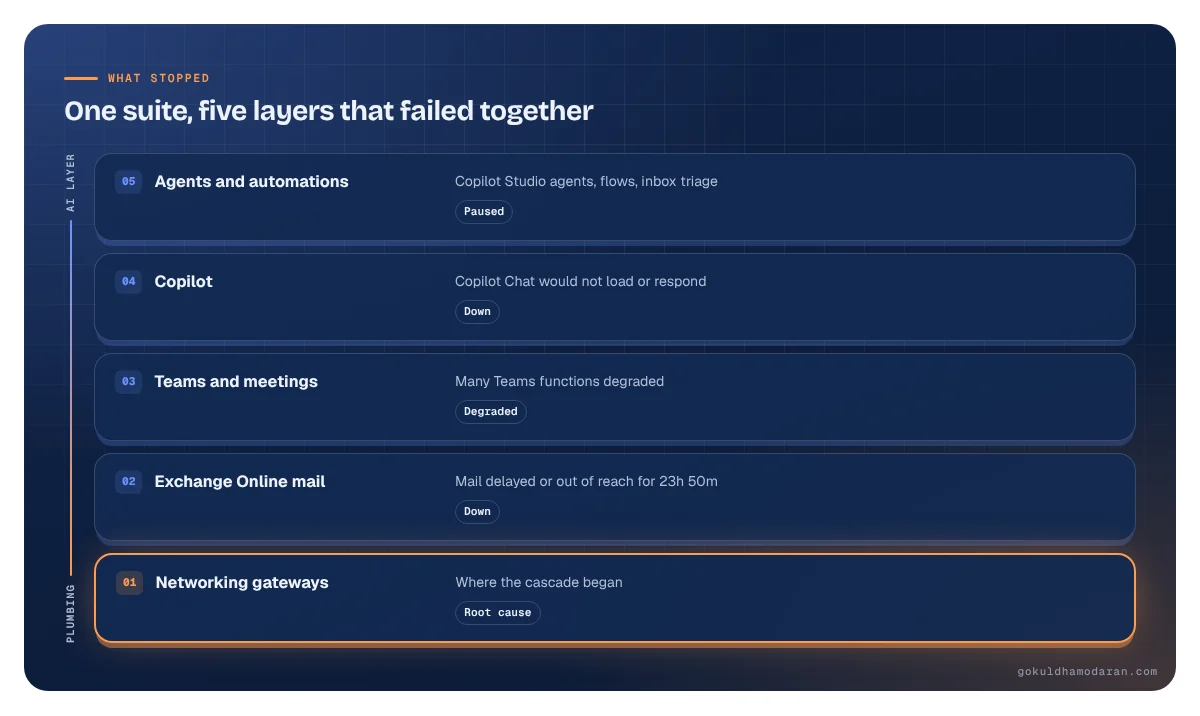
One suite, five layers that failed together
- 05Agents and automationsCopilot Studio agents, flows, inbox triagePaused
- 04CopilotCopilot Chat would not load or respondDown
- 03Teams and meetingsMany Teams functions degradedDegraded
- 02Exchange Online mailMail delayed or out of reach for 23h 50mDown
- 01Networking gatewaysWhere the cascade beganRoot cause
gokuldhamodaran.com
What caused it, according to Microsoft?
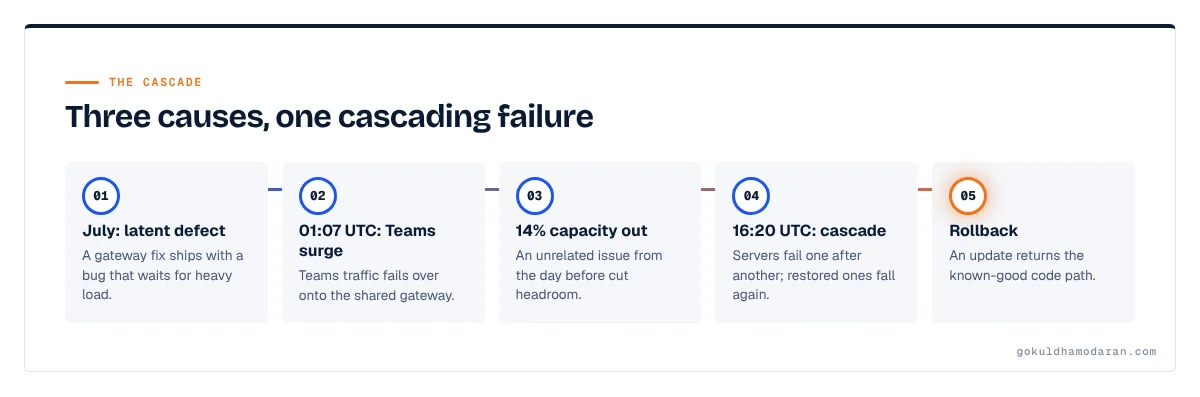
Microsoft’s preliminary report names three causes that combined into one cascade. None of them alone took the service down. Together they did, and the normal walls between server partitions did not stop the spread.
- A latent defect. A fix “prepared specifically for Microsoft 365 networking gateway servers” started rolling out in July. Under certain load it made servers overwhelmed and unresponsive. It sat quiet for months.
- A load surge. The Teams failover at 01:07 UTC pushed more traffic through the gateways, which made the defect more likely to fire.
- Less headroom. Nearly 14% of gateway server capacity was already out of service from an unrelated issue the day before.
Then one server failed, its load moved to the next, and that one failed too. In the report’s words, as Network World quoted it: “Our normally automated recovery processes were not designed to restore service from this broad unresponsive state.” The fix was an update that returned the connection code to its previous known-good path. Microsoft also extended the email delivery window so delayed messages were not bounced as undeliverable.
Charles Lamanna, Microsoft’s EVP for Copilot, Agents, and Platform, apologized and confirmed there was “no indication this is the result of malicious or cyber activity,” as Office 365 for IT Pros reported. Microsoft said a list of repair items would come in the final report. The completed items so far: more capacity, new monitoring for traffic redirection and guardrails on how traffic is spread.
Three causes, one cascading failure
- 01July: latent defectA gateway fix ships with a bug that waits for heavy load.
- 0201:07 UTC: Teams surgeTeams traffic fails over onto the shared gateway.
- 0314% capacity outAn unrelated issue from the day before cut headroom.
- 0416:20 UTC: cascadeServers fail one after another; restored ones fall again.
- 05RollbackAn update returns the known-good code path.
gokuldhamodaran.com
Why a Copilot outage now stops more than chat
Ten years ago, a Microsoft 365 outage meant people could not send mail. They picked up the phone and waited. Today the same suite carries identity, files, meetings, the assistant and a growing number of agents. Copilot reads work data through Microsoft Graph. Agents built in Copilot Studio or wired to Graph read the same mailboxes, calendars and files. I compared those layers in Claude vs Microsoft 365 Copilot.
So a Copilot outage is rarely only a Copilot outage. When the mail service goes, the agent that triages the shared inbox stops. The meeting assistant has no transcript. The approval flow that waits on an email reply sits still. And the people who would run the manual workaround cannot message each other on Teams either.
That is concentration risk. It is not an argument against Microsoft. Every large SaaS platform has bad days, and the November report is more open than many. It is an argument for knowing exactly what you have stacked on one dependency, and for deciding which of those things must keep running when it fails.
There is a quieter cost too. Anderson Economic Group estimated lost productivity could reach $7 billion, BetaNews reported. Treat that as an estimate, not a bill. But it shows why boards will ask what the plan is.
Which of your processes and agents depend on Microsoft 365?
Most companies can’t answer this in a meeting, and that is the first fix. Build one page that lists every critical process and agent, then mark which Microsoft 365 service each one needs: Entra sign-in, Exchange mail, Teams, SharePoint and OneDrive files, Graph access, or Copilot. A process that needs any of them stops in an outage like this one.
Start with the processes that cost money by the hour. Order intake by email. Customer support queues. Finance approvals that run on mail or Teams. Shift handovers. Then list the agents and automations: Power Automate flows, Copilot Studio agents, third-party tools that read a mailbox through Graph, and any homegrown agent that sends mail.
For each one, write down three things:
- What breaks if Microsoft 365 is down for four hours, and for 24.
- Who notices first, and how they would find out.
- The manual fallback, with an owner and the one tool it uses.
This is the same exercise I recommend before putting agents into ERP, covered in AI agents in ERP. Agents are only as reliable as the weakest system they reach.
How long mail was down
of Exchange Online disruption
16:20 UTC Nov 12 to 16:10 UTC Nov 13: one full European working day.
gokuldhamodaran.com

How should AI agents behave when Microsoft 365 goes down?
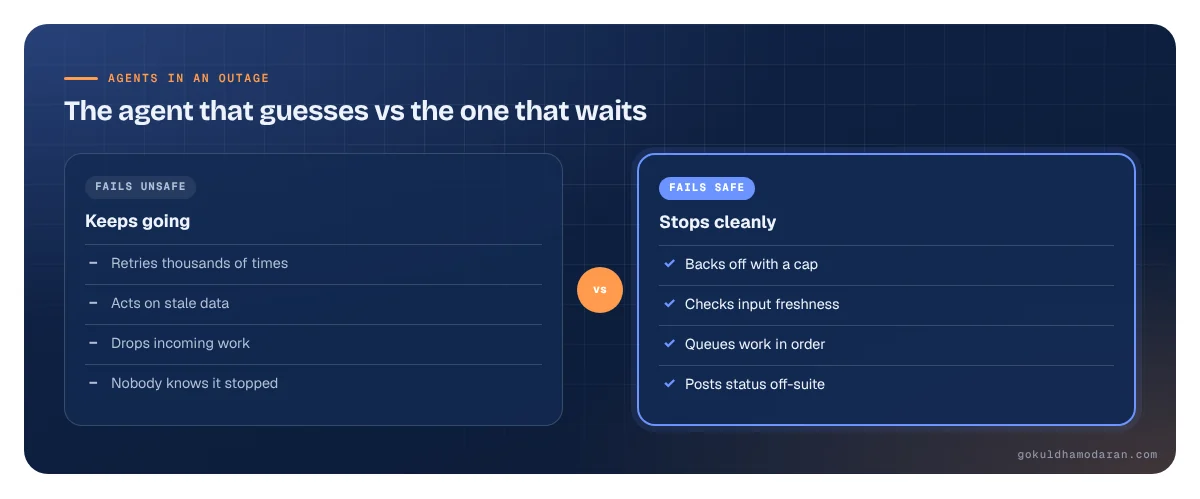
AI agent resilience means an agent stops cleanly when a dependency fails: it queues work, tells a human, and never acts on stale or partial data. The dangerous agent is not the one that crashes. It is the one that keeps going, retries thousands of times, or decides with half the facts.
When I design AI agents, the rule is that they do real work without inventing facts. An outage tests that rule hard. If an agent can’t read the mailbox, it must not guess what the customer asked. If it can’t confirm an approval, it must not assume one. The safe behaviors are simple to write down and easy to test:
- Queue, don’t drop. Hold incoming work with a timestamp, and process it in order when the service returns.
- Back off, don’t hammer. Retry with growing delays and a cap. Lamanna described “thundering herds” at Microsoft’s network edge, and your agents should not join one.
- Check freshness. Every input carries its time. Past a set age, the agent asks a human instead of acting.
- Say it’s down. Post a status to a channel outside Microsoft 365 so people know the agent paused.
- Resume with a review. After recovery, a person checks the backlog before agents clear it at full speed.
Test this on purpose. Pick one agent, block its Graph access in a test tenant for an hour, and watch what it does. That single test teaches more than any vendor slide. Much of why agent projects stall comes back to this kind of missing operational design, which I covered in why agentic AI projects fail.
The agent that guesses vs the one that waits
Keeps going
- Retries thousands of times
- Acts on stale data
- Drops incoming work
- Nobody knows it stopped
Stops cleanly
- Backs off with a cap
- Checks input freshness
- Queues work in order
- Posts status off-suite
gokuldhamodaran.com
Can you claim SLA credits for the Microsoft 365 outage?
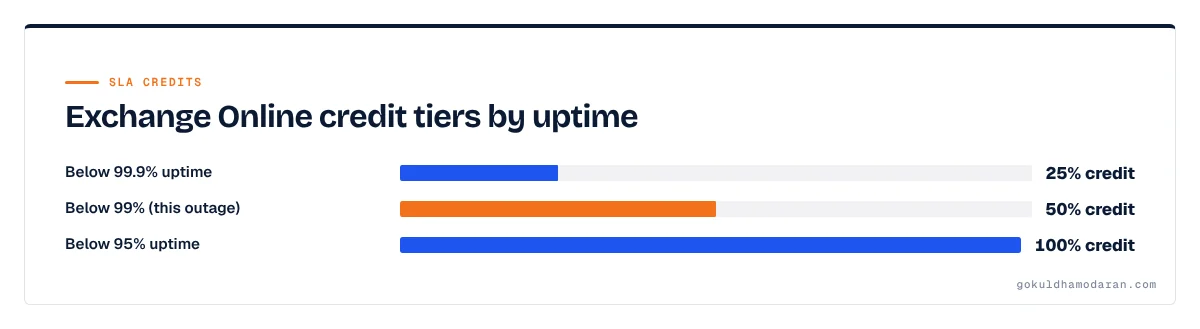
Probably yes, but credits are not automatic and there is a deadline. Exchange Online’s SLA is measured in user-minutes. Tony Redmond of Office 365 for IT Pros worked out that if every user lost access for the full 1,430 minutes, monthly uptime would be about 96.69%, which sits in the 50% credit tier.
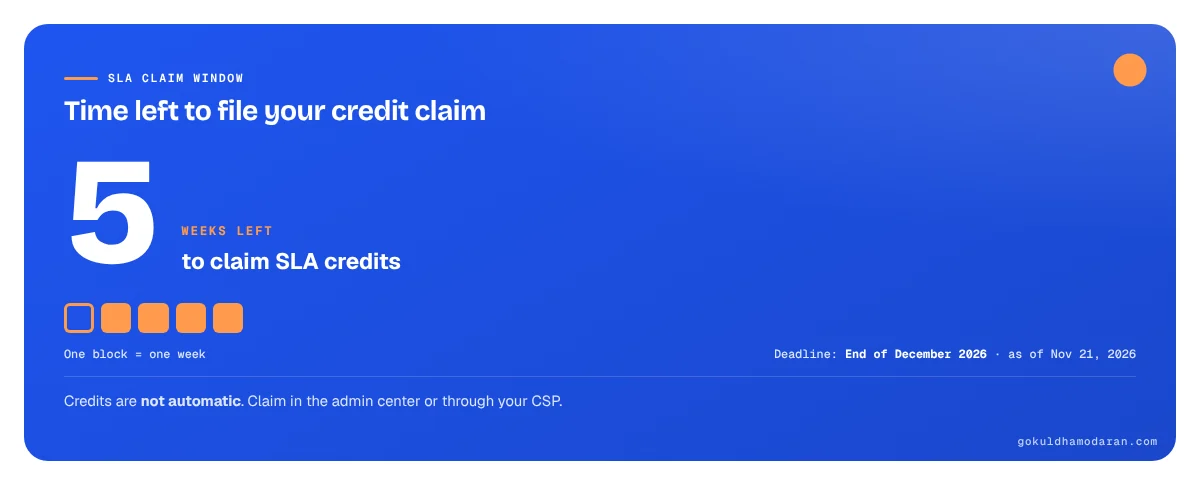
The tiers he lists: below 99.9% uptime earns a 25% credit, below 99% earns 50% and below 95% earns 100%. You claim through the Microsoft 365 admin center or your cloud solution provider, and he reports the claim must be in by the end of December 2026. Actual impact varied by tenant, so pull your own sign-in and mail-flow data before you file.
Keep the credit in proportion. A share of one month’s Exchange fee won’t cover a lost day of sales or support. Its real value is the record: a filed claim, with your impact data attached, is evidence for the next renewal talk and the next board risk review.
A Microsoft 365 business continuity plan in 5 steps
A Microsoft 365 business continuity plan now has to cover people and agents together. These five steps fit in a week for most IT teams, and each one has a clear output.
- Map dependencies (Monday). The one-page list above: critical processes, agents, and the Microsoft 365 service each needs. Output: a table with an owner per row.
- Pick a fallback per critical process (Tuesday). Phone tree, a shared status page, a backup mail route for order intake, or a printed runbook. Keep it boring. Output: one line per process.
- Set up an out-of-band channel (Wednesday). One messaging tool and one contact list that do not sign in through Entra. Test that leaders can reach each other on it. Output: a tested group with every incident lead in it.
- Make agents fail safe (Thursday). Queue, back off, check freshness, announce, resume with review. Block one agent’s access in a test tenant and confirm. Output: a pass or fail per agent.
- Read the report and file the claim (Friday). Read the final post-incident report, compare its repair items with your risks, and file the SLA claim. Output: a short note to the CIO and the filed claim.
Add one security step on day one. NCC Group’s Matt Hull warned, as CIO.com reported, that criminals exploit outages like this. Tell staff that nobody from IT will ask them to reset a password, approve an MFA prompt or grant remote access because of the outage, and to check any such request through a known channel.
Time left to file your credit claim
weeks left
to claim SLA credits
One block = one weekDeadline: End of December 2026 · as of Nov 21, 2026
Credits are not automatic. Claim in the admin center or through your CSP.
gokuldhamodaran.com
What this means for European IT leaders
Timing made this outage harder for Europe. It began after 17:00 in Central Europe and lasted almost to the end of Friday’s working day. Teams in London, Paris or Berlin lost the last hours of Thursday and nearly all of Friday. Rail, health and public services were among the users BetaNews listed, which is why European boards will read the final report closely.
If your company runs on one suite for both work and AI, put that on the risk register by name, with an owner and a tested fallback. If you are in a regulated sector, ask your legal and compliance team how the incident fits your operational resilience and third-party risk duties. Check the details with your legal team. For North American readers the lesson is the same: the outage started mid-morning on the US East Coast, and the plan above works on any continent.
Is one suite for work and AI a risk you priced?
Most companies chose Microsoft 365 for work years ago and are now adding Copilot and agents on top because the data is already there. That is a sensible choice. It also means the cost of an outage keeps rising, quietly, every time a new agent goes live on the same base.
My read: don’t run from concentration. Price it. For each new agent, ask one question before launch: what does this do when Microsoft 365 is gone for a day? If the answer is “it waits, says so, and a human covers the work”, ship it. If nobody knows, the agent isn’t ready yet. The SaaS debate I wrote about in will AI replace SaaS runs into the same question from the other side: AI makes the platform underneath more important, not less.
The next outage will have a different cause. A SaaS outage plan that maps dependencies, names fallbacks and makes agents fail safe will still work. Start the one-page map on Monday.
Frequently asked questions
How long was the Microsoft 365 outage in November 2026?
Microsoft's preliminary post-incident report puts it at 23 hours and 50 minutes, from 16:20 UTC on Thursday, Nov 12 to 16:10 UTC on Friday, Nov 13. Some services, such as Teams and SharePoint, recovered earlier, while Exchange Online mail took longest and queued messages were still being delivered on Friday.
Was the Microsoft 365 outage a cyberattack?
No. Microsoft said there was no indication of malicious or cyber activity. Its report blames a latent defect in a July fix for networking gateway servers, a traffic surge after a Teams failover and capacity already lost to an unrelated issue. Attackers still use outages for phishing, so warn staff.
Why did Copilot stop working during the Outlook outage?
Copilot depends on the same Microsoft 365 services as mail, including sign-in, Graph access to work data and the network gateways that failed. When those layers broke, Copilot Chat could not load or respond. Any agent or automation built on the same mailboxes, calendars and files stopped for the same reason.
How do I claim SLA credits for the Microsoft 365 outage?
File a claim in the Microsoft 365 admin center or through your cloud solution provider. Credits are not automatic. Office 365 for IT Pros reports the deadline is the end of December 2026 and estimates the outage falls in the 50% credit tier if all users were affected. Attach your own impact data.
What should an AI agent do when Microsoft 365 is down?
It should stop cleanly. Queue incoming work with timestamps, retry with growing delays and a cap, refuse to act on inputs past a set age, post its status somewhere outside Microsoft 365, and let a human review the backlog before clearing it. Test this by blocking one agent's access in a test tenant.
Sources
- Microsoft: Preliminary Post Incident Report for Microsoft 365, EX1550543 / MO1550821 (Nov 15, 2026)
- BleepingComputer: Microsoft says months-old bug caused global Microsoft 365 outage (Nov 16, 2026)
- Office 365 for IT Pros: The Great Exchange Online Meltdown of November 2026 (Nov 16, 2026)
- CIO.com: M365 services slowly come back online after global outage (Nov 13, 2026)
- BetaNews: Microsoft says network upgrade caused Microsoft 365 outage (Nov 13, 2026)
- ITPro: Microsoft exec lifts lid on the cascading failure behind the Microsoft 365 outage (Nov 16, 2026)
- Network World: Microsoft outage, a cascading failure that started with an undetected bug (Nov 16, 2026)

Gokul Dhamodaran
I turn what is happening at the AI frontier into what it means for enterprise systems, and I build AI products myself (Euliv Analytics, Vantage). I write Leading Indicator every Friday: the AI and enterprise tech moves that matter, and what they mean for you.
Views are my own and do not represent any employer or client. Graphics are original; sources are linked.