The short answer
Claude vs Microsoft 365 Copilot is a choice of AI work surface, not a contest of models. Pick Copilot where work lives in Microsoft 365 and Entra, Purview and Teams policies already govern it. Pilot Claude where teams work across many systems. Most enterprises will run both, scoped by team.
Key takeaways
- Anthropic's Nov 10 launch added Sheets, Whiteboards, Claude Data and Meetings. Claude Data turns on by default for Enterprise on Nov 20.
- Copilot reads work data through Microsoft Graph. Claude reaches it through connectors, Microsoft 365 included.
- List prices: $30 per user per month for Microsoft 365 Copilot, $20 per seat for Claude Enterprise, with usage billed on top of both.
- Claude already runs inside Copilot (Researcher, Copilot Studio, Cowork). The decision is the surface, not the model.
- Run a 30-day, side-by-side pilot with real tasks and a spend cap, then scope each tool by team.
On Nov 10, 2026, Anthropic shipped Claude Sheets and Claude Whiteboards in beta, made Claude Data generally available and showed Claude Meetings, an AI that joins a video call as a visible participant. On Nov 20, Claude Data switches on by default for Enterprise organizations unless an admin changes it first. That is a setting someone in your company should look at this week.
So Claude vs Microsoft 365 Copilot is no longer a chatbot comparison. It is a choice about which AI work surface sits on top of your documents, meetings and data, and who controls it. My read: most large companies will end up running both, so the useful question isn’t which one wins. It’s which teams pilot what, under which rules, before the next Microsoft renewal.
What changed in November 2026?
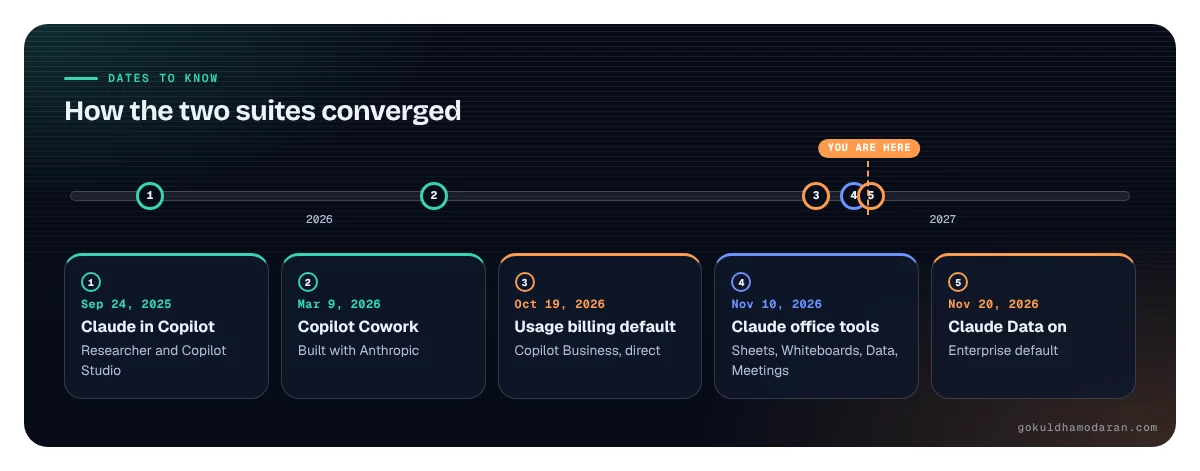
Anthropic turned Claude from an assistant into something closer to an office suite, while Microsoft moved more of Copilot’s agent work onto metered credits. Here is the dated list, each item from the publisher that announced it:
- Nov 10, 2026: Claude Sheets and Claude Whiteboards launch in beta on all paid plans. Claude Data, formerly Claude Dashboards, becomes generally available and works with warehouses such as BigQuery, Amazon Redshift and ClickHouse (Anthropic announcement).
- Nov 10, 2026: Interactive connectors let partners such as Adobe and Atlassian embed their apps inside Claude, and plugins arrive for Salesforce (beta), NetSuite and Workday (beta) (Anthropic).
- Nov 10, 2026: Claude Meetings is announced in beta for Team and Enterprise plans, with Google Meet at launch (TechCrunch).
- Nov 20, 2026: Claude Data turns on by default for Enterprise plans. Sheets and Whiteboards stay off for Enterprise until an admin enables them; on Team plans all three are already on.
- Since Oct 19, 2026: new Microsoft 365 Copilot Business subscriptions bought directly from Microsoft come with usage-based billing on by default. Microsoft pushed the default for partner (CSP) purchases from Dec 1 into January to March 2027 (LazyAdmin, citing Microsoft message center MC1476200).
The Claude Data default is the one to act on first. You change it under Organization settings > Artifacts. If your warehouse connectors are already approved, turning it on may be fine. If nobody has reviewed which data sources Claude can query, keep it off until someone has.
How the two suites converged
- 1Claude in CopilotResearcher and Copilot Studio
- 2Copilot CoworkBuilt with Anthropic
- 3Usage billing defaultCopilot Business, direct
- 4Claude office toolsSheets, Whiteboards, Data, Meetings
- 5Claude Data onEnterprise default
gokuldhamodaran.com
Claude vs Microsoft 365 Copilot at a glance
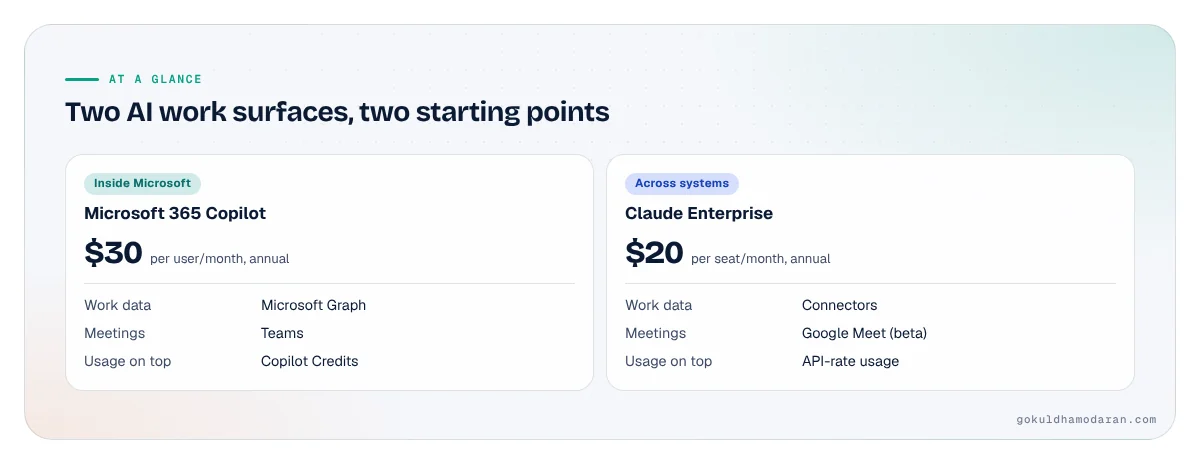
Claude vs Microsoft 365 Copilot comes down to where each one starts. Copilot starts inside Microsoft 365: it reads your mail, chats, meetings and files through Microsoft Graph and lives in Word, Excel, Outlook and Teams. Claude starts as its own workspace and reaches into other systems through connectors, including a Microsoft 365 connector. Prices below are list prices checked November 2026.
| What you’re comparing | Microsoft 365 Copilot | Claude (Team and Enterprise) |
|---|---|---|
| Seat price (annual) | $30 per user per month, on top of a qualifying Microsoft 365 plan | $20 per seat per month (Team Standard and Enterprise) |
| Usage on top | Copilot Credits for Cowork, advanced SharePoint and OneDrive work, Work IQ API | Enterprise: usage billed at API rates on top of seats |
| Where work data comes from | Microsoft Graph and the Semantic Index | Connectors (Microsoft 365, Salesforce, warehouses and more) |
| Meetings | Copilot in Teams meetings | Claude Meetings (beta, Google Meet at launch) |
| Spreadsheets and boards | Copilot in Excel, Whiteboard | Claude Sheets and Whiteboards (beta) |
| Admin home | Microsoft 365 admin center, Purview, Entra | Claude organization settings, SSO, SCIM and audit logs on Enterprise |
| Training on your data | No, per Microsoft’s privacy documentation | No by default on Team and Enterprise |
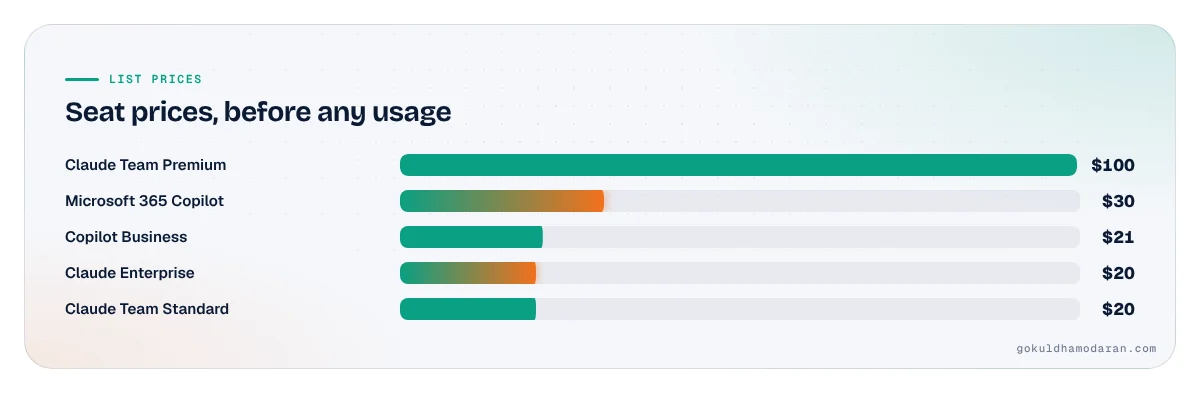
Sources: Microsoft 365 Copilot enterprise pricing, Claude plans and pricing, both checked November 2026. Microsoft 365 Copilot Business, for smaller firms, lists at $21 per user per month on an annual plan, with an $18 promotion through Dec 31, 2026 (Microsoft).
Two AI work surfaces, two starting points
Microsoft 365 Copilot
Claude Enterprise
gokuldhamodaran.com
Where does the work data live?
With Microsoft 365 Copilot, your work data never has to move to reach the AI: Copilot reads email, chats, meetings, calendars and documents through Microsoft Graph and only shows what each user already has permission to view. With Claude, the data stays in its home system and Claude fetches it through a connector when someone asks. Both respect existing permissions. They differ in where the map of your company lives.
Microsoft’s privacy documentation says the Semantic Index honors each user’s access, and that prompts, responses and Graph data are not used to train foundation models. The upside is depth: Copilot already knows who met whom, which file was edited last and which thread matters. The catch is that it will surface anything a user can technically open. If your SharePoint is overshared, Copilot makes the oversharing easy to find. That is why Microsoft bundles SharePoint Advanced Management with the license.
Claude’s Microsoft 365 connector reaches Outlook, SharePoint, OneDrive and Teams with delegated permissions. It can’t get around SharePoint sharing settings, it acts as a proxy that “doesn’t cache file content”, and a Global Administrator must consent once for the whole tenant. Write tools, such as sending mail or Teams messages, must be enabled by an admin. Tool results do stay in saved chats, so your retention policy has to cover Claude conversations too.
Graph grounding vs connectors
Data already mapped
- Reads mail, chats, files via Graph
- Shows only what users can view
- Deep Microsoft 365 context
- Oversharing becomes easy to find
Data fetched on demand
- Connectors to many systems
- Delegated Microsoft 365 permissions
- No file content cached
- Results kept in saved chats
gokuldhamodaran.com
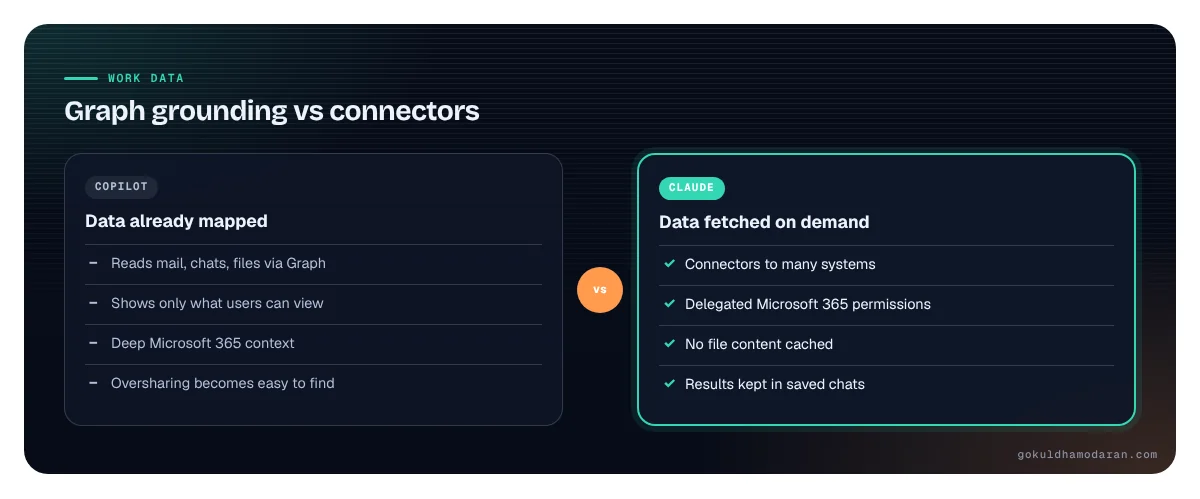
The practical difference shows up in mixed stacks. If your CRM is Salesforce, your warehouse is BigQuery and your tickets live in Atlassian, Claude’s connector model reaches them with less custom work. If almost everything that matters lives in Microsoft 365, Copilot’s Graph grounding is hard to match.
How do identity and admin controls compare?
Microsoft 365 Copilot inherits the controls you already run: Entra ID for identity, Purview for retention and eDiscovery, and the Microsoft 365 admin center for licensing and spend. Claude for enterprise brings its own admin layer: SSO on Team and Enterprise, plus SCIM provisioning, audit logs, custom data retention and a Compliance API on Enterprise only, per Anthropic’s plan page.
Claude’s connector controls are more granular than many teams expect. Anthropic says admins can restrict what a connector does, for example letting Claude read Slack but not send messages, and decide who can use which products and connectors. Claude auto-connect, in beta, lets an admin set up an app once so employees are connected the first time they use it. Convenient, and also the kind of switch your security team should approve before it’s flipped.
The question I’d ask in either case: when an AI takes an action, can you tell which person asked for it, which tool it used and what it touched? If the answer needs three consoles and a support ticket, fix that before you scale. I covered the same gap for agents in why agentic AI projects fail; shared credentials and missing audit trails sink copilots too.
Which is better for meetings, and what should your AI meeting assistant policy say?
Neither is simply better. Copilot in Teams is mature and governed by Teams meeting policies. Claude Meetings is a new beta that joins Google Meet calls as a visible participant and can draft the plan, update a whiteboard and pull figures from connected apps while people talk. What matters more than the feature list is the policy you set before either one joins a call with a customer.
Microsoft gives admins four Copilot settings in Teams meeting policies. The default is “On with saved transcript required.” The “Only during the meeting” option lets Copilot work from speech-to-text that isn’t saved after the call, though Purview may still keep prompts and responses (Microsoft Learn). According to TechCrunch, Claude Meetings posts a notice in the meeting chat, won’t join calls with external guests unless an admin authorizes it, and leaves automatically if an external guest joins.
A one-page AI meeting assistant policy should answer five things:
- Who may invite an AI to a meeting, and on which internal meeting types.
- External guests: allowed, allowed with notice, or never. Start with never.
- What is kept: transcript, notes only, or nothing after the call ends.
- Where notes go and who can see them, especially for HR, legal and board meetings.
- Recording consent: what attendees are told, in what words. Some US states require every party’s consent to record, so check the details with your legal team.
How much do Claude and Microsoft 365 Copilot cost?
Microsoft 365 Copilot lists at $30 per user per month on an annual plan, on top of a qualifying Microsoft 365 license. Claude Enterprise lists at $20 per seat per month on an annual plan with a 20-seat minimum, plus usage billed at API rates. Both now mix a seat price with metered work, so the seat price alone won’t tell you the bill.
On Microsoft’s side, the meter is Copilot Credits. Microsoft’s usage-based billing page, updated Nov 3, 2026, lists Cowork, advanced work in SharePoint and OneDrive, the Work IQ API, Teams Phone Agent and Code as services managed this way. One default to change: “auto-apply new services” is on, so future services join your spending policy without review. For Copilot Business, LazyAdmin reports $0.01 per credit and a default limit of 4,000 credits per user per month, about $40.
On Claude’s side, Team plans run $20 per Standard seat or $100 per Premium seat per month on annual billing, for 2 to 150 seats. Enterprise adds usage at API rates, and admins can set user and organization spend limits. That model rewards light users and charges heavy ones, which is fair, and also hard to forecast in month one.
What to do: run both pilots with a spend cap per user from day one, and track cost per completed task, not cost per seat. A team that saves four hours a week on board decks can justify a high bill. A team that opens the tool twice a month can’t justify any.
What about data residency and retention?
For EU customers, Microsoft 365 Copilot is an EU Data Boundary service, and Copilot is covered by Microsoft’s data residency commitments in the Product Terms. There is one exception that matters here: Microsoft says Anthropic models used inside Copilot are excluded from the EU Data Boundary. On the retention side, Copilot stores each prompt and response as activity history, and admins can set Purview retention policies for it.
For Claude, custom data retention controls are an Enterprise feature, and Team and Enterprise plans don’t train on your content by default. Anthropic’s plan page doesn’t list data residency as an Enterprise plan feature; it mentions US-only inference for API workloads. If you sell into regulated industries or the EU, ask Anthropic’s sales team in writing where Claude for enterprise processes and stores data for your plan before a broad rollout.
The North American angle: most US companies won’t hit a residency wall. They will hit a retention question. Ask legal how long AI chat history, meeting notes and connector results should live, and set both tools to that number on day one.
 ResidencyAsk where the model runs, not just the app
Is it Claude or Copilot, or both?
For many enterprises it is already both. Anthropic said in September 2025 that Claude models were coming to Microsoft 365 Copilot’s Researcher agent and Copilot Studio. Directions on Microsoft reports that since January 2026, Anthropic has been a Microsoft subprocessor and is enabled by default in commercial tenants, while disabled in the EU, EFTA and UK. Microsoft’s Copilot Cowork, announced March 9, 2026, was built with Anthropic and uses the same Claude model and agentic harness as Claude Cowork (Implicator).
So the real decision is about the surface, not the model. Do you want Claude’s intelligence delivered inside Microsoft’s apps, governed by Microsoft’s admin center and billed by Microsoft? Or do you want Claude’s own workspace, with its own sheets, boards and meetings, reaching into Microsoft 365 and everything else through connectors? Each choice deepens a different kind of lock-in: one to Microsoft’s tenant, the other to a new workspace your people learn and store work in.
I build AI tools myself, including analytics that answer business questions in plain English and show the query behind every number. The lesson that carries over: people trust the AI surface where they can check the work. Pick the pilot teams by where that checking is easiest, not by which logo is already on the contract. It’s the same pattern I described in will AI replace SaaS: the work surface moves before the system of record does.
How should CIOs evaluate both in 30 days?
Run a 30-day, side-by-side evaluation with two or three teams, a fixed set of real tasks and a cost cap. The goal is a decision on scope for each tool, not a winner.
- Week 0, check the defaults. Claude: Organization settings > Artifacts (Claude Data, Claude Sheets, Whiteboards), connector write tools and auto-connect. Microsoft: the Anthropic model toggle in Copilot settings, Teams meeting Copilot policy, and Cost management spending policies.
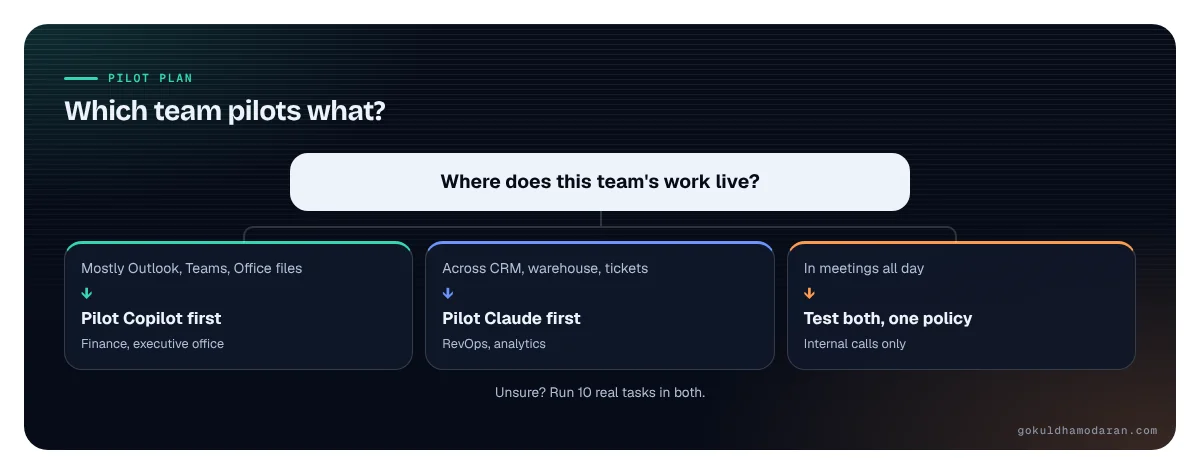
- Week 1, pick the teams. One Microsoft-heavy team (finance, executive office), one cross-system team (revenue operations, analytics) and, if you can, one team that lives in meetings (program management).
- Week 1, write 10 real tasks per team. A board pack, a pipeline review, a variance explanation. Score each tool on accuracy, time saved and whether a reviewer could check the sources.
- Weeks 2 to 3, run both. Same tasks, same people, spend capped per user in Claude and in Copilot Credits. Log every wrong answer and every permission surprise.
- Week 4, decide scope. Which teams get which tool, which features stay off, and which questions go into the next Microsoft renewal.
If you’re also weighing smaller, cheaper models for routine work, my guide on small language models for enterprise covers where they fit.
Which team pilots what?
Where does this team's work live?
- Mostly Outlook, Teams, Office filesPilot Copilot firstFinance, executive office
- Across CRM, warehouse, ticketsPilot Claude firstRevOps, analytics
- In meetings all dayTest both, one policyInternal calls only
Unsure? Run 10 real tasks in both.
gokuldhamodaran.com
Questions to bring to your next Microsoft renewal
- Which Copilot services draw Copilot Credits today, and which ones are planned for next year?
- Can we turn off “auto-apply new services” in our spending policies, and who gets alerted at 80% of a limit?
- Where are Anthropic models processing our data when users pick Claude inside Copilot, and under which terms?
- What does it cost to license Copilot only for the teams that use it weekly?
- Which agent features are generally available, and which are still in preview or the Frontier program?
Ask Anthropic the mirror questions: where data is processed for your plan, how usage is billed and capped, which features are beta, and what the Compliance API exports. Then put both answers side by side.
The free kit below has the 30-day scorecard, the default settings to check on both sides, a one-page AI meeting assistant policy and the renewal questions, ready to fill in.
Frequently asked questions
Is Claude better than Microsoft 365 Copilot?
Neither is better across the board. Microsoft 365 Copilot fits work that lives in Outlook, Teams, SharePoint and Office files, governed by Entra and Purview. Claude fits teams that work across Salesforce, data warehouses, Atlassian and Microsoft 365 through connectors. Test both on ten real tasks per team and compare accuracy, time saved and how easily a reviewer can check the sources.
Can Claude access Microsoft 365 data?
Yes. Claude's Microsoft 365 connector reaches Outlook, SharePoint, OneDrive and Teams with delegated permissions, so users only see what they already can. A Global Administrator must consent once for the tenant, and on Team and Enterprise plans an Owner must enable the connector first. Write actions such as sending mail need an admin to turn them on.
What is Claude Meetings?
Claude Meetings, announced Nov 10, 2026 in beta for Team and Enterprise plans, adds Claude to a video call as a visible participant. It works with Google Meet at launch. It can draft plans, update a whiteboard and pull figures from connected apps during the call. It won't join calls with external guests unless an admin allows it.
How much does Microsoft 365 Copilot cost compared with Claude?
Microsoft lists Microsoft 365 Copilot at $30 per user per month on an annual plan, on top of a qualifying Microsoft 365 license. Claude Enterprise lists at $20 per seat per month on an annual plan with a 20-seat minimum, plus usage at API rates. Both meter heavier agent work, so budget on cost per task, not seat price alone.
Is Claude Data turned on by default?
On Enterprise plans, Anthropic says Claude Data turns on by default on Nov 20, 2026 unless an admin changes it. Claude Sheets and Whiteboards stay off for Enterprise until enabled. On Team plans all three are on by default. Admins change these settings under Organization settings, then Artifacts.
Sources
- Anthropic: Claude Whiteboards, Claude Sheets, and Claude Data (Nov 10, 2026)
- Anthropic: More ways to work with Claude Sheets, Whiteboards and interactive connectors (Nov 10, 2026)
- TechCrunch: Anthropic launches Claude Meetings (Nov 10, 2026)
- Anthropic: Claude plans and pricing (checked Nov 2026)
- Anthropic: Microsoft 365 connector security guide
- Anthropic: Claude is now available in Microsoft 365 Copilot (Sep 2025)
- Microsoft: Microsoft 365 Copilot enterprise pricing (checked Nov 2026)
- Microsoft: Microsoft 365 Copilot business plans and pricing (checked Nov 2026)
- Microsoft Learn: Usage-based billing for Copilot Credits (updated Nov 3, 2026)
- Microsoft Learn: Data, privacy and security for Microsoft 365 Copilot
- Microsoft Learn: Manage Copilot in Teams meetings and events
- Directions on Microsoft: M365 Copilot adds choice and risk with Anthropic's Claude (updated Jun 12, 2026)
- LazyAdmin: Copilot Business usage-based billing
- Implicator: Microsoft launches Copilot Cowork built on Claude (Mar 9, 2026)

Gokul Dhamodaran
I turn what is happening at the AI frontier into what it means for enterprise systems, and I build AI products myself (Euliv Analytics, Vantage). I write Leading Indicator every Friday: the AI and enterprise tech moves that matter, and what they mean for you.
Views are my own and do not represent any employer or client. Graphics are original; sources are linked.